What We Learned Shipping an MCP Product for Tariff Code Compliance

At Tariff Code Compliance, we make tariff code research available to people and agents. The Explorer browser workflow is one way to research; the Claude and ChatGPT setup guides show how to bring that evidence into an agent conversation. We’ve been iterating on our MCP, and here’s some scar tissue we have from shipping:
- MCP vs CLI is a classic nerd turf war. Just ship an MCP.
- There’s a tension between the types of tools you expose via MCP: high-level tools that wrap functionality, or low-level tools that require skills to generate something useful.
- ChatGPT and Claude plugin platforms are a new acquisition surface, but the pre-install and post-install experience sucks. You and your customers are flying blind.
- Submissions are a precious commodity. Naively pushing a new submission can set you back weeks on both OpenAI and Anthropic.
Nerd Wars: MCP vs CLI
I fundamentally don’t believe a CLI is the right shape for a normal consumer. They’re not going to have an environment where they can install one. They’re using ChatGPT or Claude, possibly on their phone, and asking them to install a command-line tool is a lot to ask before they can even try the product. Then there’s the other side of that decision. Once you’ve shipped a CLI, how do you get people to update it? What does it mean to move everyone along to the next version?
As an industry, we’ve already solved a lot of that with services available over the web (API, MCP, etc.). We can change the implementation under the hood while continuing to respond through the same interface. There’s still a contract to maintain, but we don’t need the customer to install a new binary to get an implementation change. For the people we’re building for, going back to distributing a CLI felt like a step backwards. We shipped hosted MCP, which solved that problem and introduced some others.
High-level tools, or low-level tools plus skills?
For Tariff Code Compliance, I chose not to build the MCP directly off our API. The API we have is tailor-made for the web experience; we don’t offer it as a public API. Think of these as fat APIs that serve an experience we’ve already put together. For MCP, our bet is that smaller, more orthogonal tools will let agents compose useful experiences, including ones we haven’t built ourselves. We’re not yet sure that’s the right direction. Under the hood, both share code for accessing databases, emitting billing events, and the mid-level constructs that wrap our business functionality.
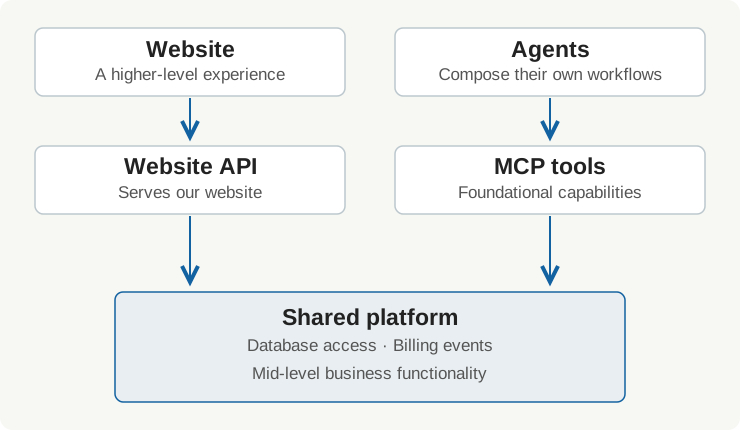
Smaller tools need guidance on how to use them together, so we publish a classification skill. The hard part is getting an agent that’s already using our MCP to discover that skill and use it. Publishing the instructions doesn’t get us there on its own.
We also expose guidance through MCP prompts that clients can list and retrieve, but we haven’t seen agents reliably find and use them. These prompts take arguments and feel more like function calls than the skills we develop locally. We can serve them correctly and still have the agent miss the guidance it needs.
It’s hard for a person to find them, too. In Claude, you start at the composer’s plus menu, go into Connectors, find “Add from Tariff Code Compliance,” and then choose “Classify a product.” Only then do you get the prompt’s input form. There’s a separate Skills menu right above Connectors, but that isn’t where these MCP prompts live. You have to know which kind of thing we shipped before you know where to look for it.
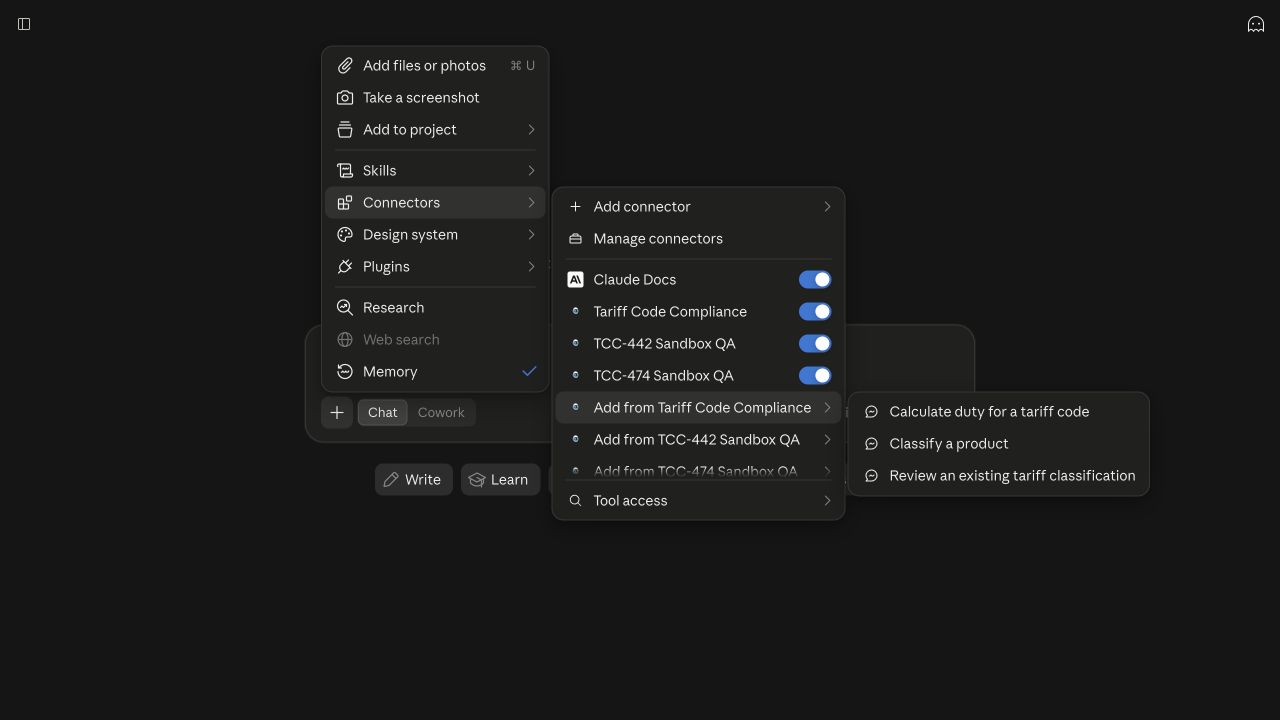
Claude: three nested menus before selecting the prompt. Click the screenshot to see it at full size.
In ChatGPT, we looked in the plugin directory, opened Tariff Code Compliance, and clicked the app inside the listing. That brought up the tool descriptions below, including “Get node” and “List node edges.” We found the plumbing, but no classification prompt in that view. That doesn’t establish what an agent can discover on its own; it shows what a customer encounters when they go looking for how to use this thing.
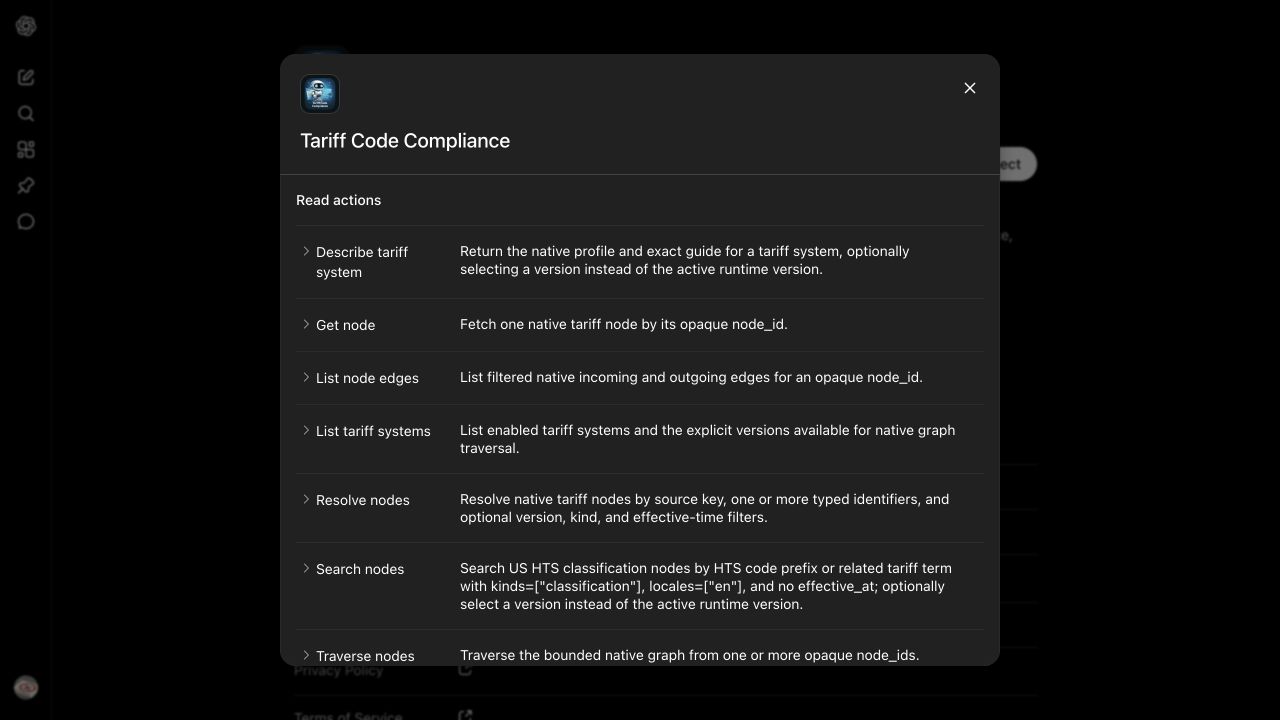
ChatGPT: plugin listing → app details → individual tools. Click the screenshot to see it at full size.
There is movement here: the MCP Skills extension, introduced through SEP-2640, defines discovery and retrieval for skills served over MCP. That’s much closer to what we want than trying to make parameterized prompts behave like local skills. The extension gives this a protocol shape; whether it improves our customer’s experience still depends on support in the SDKs and clients we use.
I think this decision depends on who uses your application. For a consumer product, your MCP tools should probably offer higher-level experiences that get someone to a useful result without requiring them to discover a skill first. For a more professional audience, smaller, orthogonal tools give people room to put together their own workflows. Those users, or you through consulting, can wrap the tools into higher-level experiences for customers via skills. That’s the direction we’re betting on, with skill discovery still an unresolved part of the experience.
A new acquisition surface, and everyone’s flying blind
ChatGPT and Claude give us a new place to acquire customers, but we don’t get the visibility we’d expect from our own website. When we looked at Claude’s submission dashboard, we could see usage and health metrics, but not the listing impressions, install clicks, and signup funnel we wanted. For our ChatGPT plugin, we don’t have an equivalent analytics dashboard at all. We can see more in our own systems once someone authenticates and calls tools, but we still don’t know much about what brought them there or what they expected the product to do.
Then there’s the handoff after installation. ChatGPT has a small, easy-to-miss “Try Now” button, and we eventually found that we could supply a default prompt for it. If you’re looking for the setting, it’s interface.defaultPrompt in the plugin metadata. That gives us a way to get someone started, although it wasn’t obvious to us when we were shipping. We haven’t had an equivalent default-prompt handoff in our Claude installation flow, so someone connects and is left to figure out what to ask. We have very little visibility into that moment or control over what happens next.
Even when MCP calls are coming through, we don’t know what the customer’s experience is like. In one Claude test, classification worked but required repeated approvals for individual tools, so what looked like a working product from our side was a bunch of interruptions for the person using it. When the calls stop, we can’t tell from those calls alone whether they finished or gave up.
Submissions are a precious commodity
Our submissions and updates have taken weeks on both OpenAI and Anthropic, so we’ve learned to batch listing copy, examples, and other changes that need review into the same submission. Sending each small fix through separately means another wait, even when the change itself is ready to go.
Hosting the server on the web only gets us part of the way there. We can change an implementation behind an existing interface, but that’s different from updating the listing or getting new MCP definitions exposed in a client. Claude and ChatGPT don’t necessarily refresh those definitions the same way, either. We’ve had to check what a new connection sees versus an existing one, including whether refreshing or reconnecting changes what’s available. Our deployment being finished doesn’t mean the customer is using what we just shipped.